OPcache speeds up PHP applications. Normally PHP reads and compiles your scripts on every request. OPcache keeps the compiled code in memory, so later requests skip that work. It needs no changes to your application and has no connection details: it runs inside PHP itself.
Getting here: Servers → select a server → Packages. OPcache is in the Caching category.
1. When to Use OPcache
- You run PHP applications, such as Laravel, WordPress, Magento or Core PHP.
- You want faster response times and lower CPU use without code changes.
OPcache does not help Node, Python or other non-PHP applications. It also does not replace data caches like Redis or Memcached: it caches compiled code, not application data. Most PHP servers run OPcache together with one of them.
2. Install OPcache
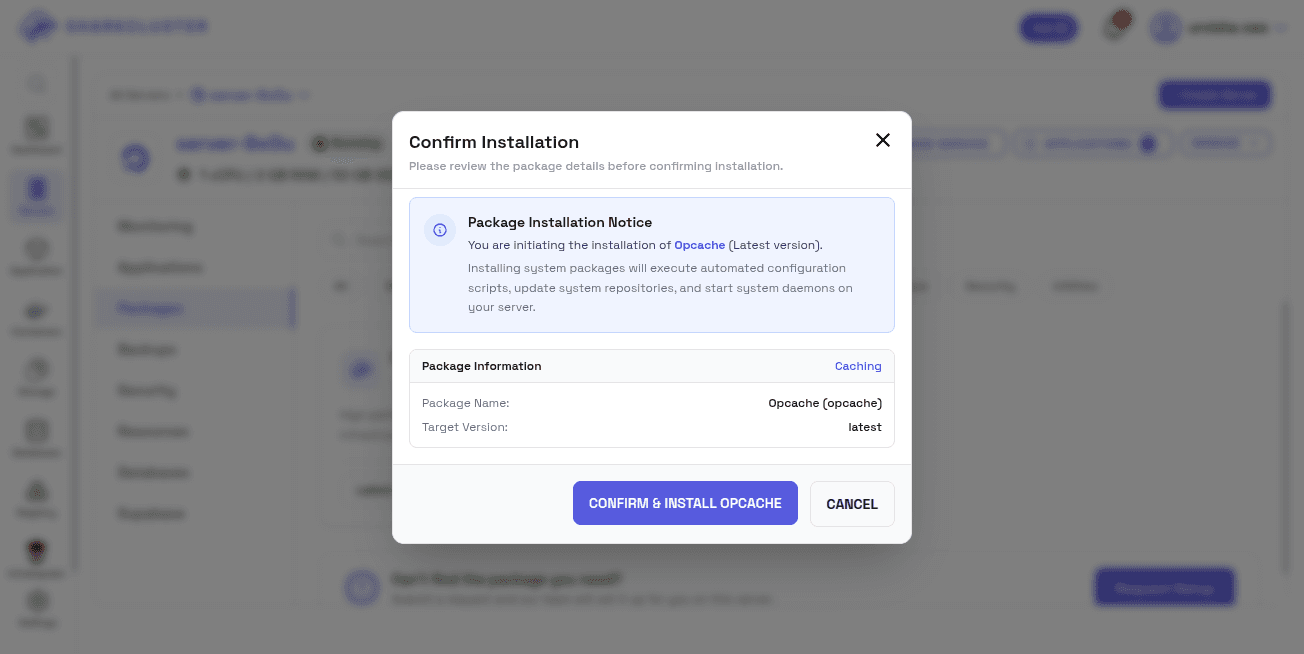
OPcache is part of PHP, and on most servers it is already installed and enabled. Check the Installed tab first: if OPcache is listed, there is nothing to install.
If it is not listed:
- 1Open Packages and select the Browse tab.
- 2Select the Caching filter, or search for
opcache. - 3Click Install on Opcache and confirm.
OPcache is installed for the server's PHP version (as php8.3-opcache, for example), and PHP-FPM is restarted automatically, which briefly interrupts PHP requests. If it was already active, a message says so and nothing changes.
3. Manage OPcache
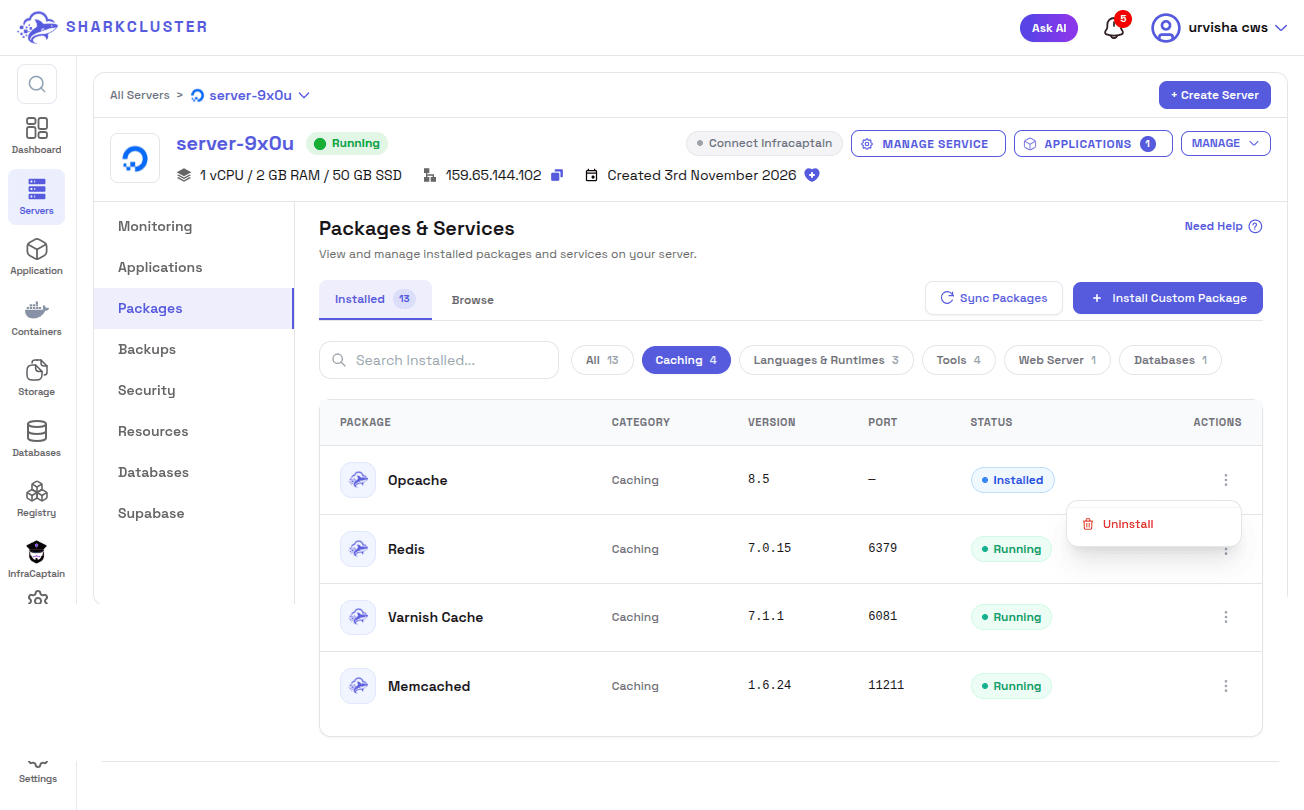
OPcache is not a separate service, so there is no Restart, Stop or Upgrade for it. It follows the PHP version it belongs to. On the Installed tab, open the menu next to OPcache:
| Action | What it does |
|---|---|
| Details & Config | Opens the OPcache tab with its status, logs and configuration file. |
| Uninstall | Removes the OPcache extension and restarts PHP-FPM. PHP applications keep working but lose opcode caching and become slower. |
To clear OPcache, restart PHP from the Installed tab. The compiled code is rebuilt as requests come in, so the first requests afterwards are slightly slower.
4. OPcache Configuration
The OPcache tab has a Config File view for the OPcache settings file, /etc/php/<version>/mods-available/opcache.ini.
- 1Click Load Config to fetch the file from the server.
- 2Click Edit Config to unlock it, and make your changes. Lock Read-Only locks it again.
- 3Click Save OPcache Configuration and confirm.
Saving overwrites opcache.ini on the server and restarts PHP-FPM. Reload fetches the file again and Discard throws away unsaved changes.
Common Settings
| Setting | What it controls | Typical value |
|---|---|---|
opcache.enable | Turns OPcache on (1) or off (0) for web requests. | 1 |
opcache.memory_consumption | Memory for compiled code, in MB. | 128, or 256 for large applications such as Magento |
opcache.interned_strings_buffer | Memory for repeated strings, in MB. | 8 to 16 |
opcache.max_accelerated_files | How many PHP files can be cached. | 10000, or 20000+ for large applications |
opcache.validate_timestamps | Whether OPcache checks for changed files. 0 is fastest but needs a PHP restart after every deploy. | 1 |
opcache.revalidate_freq | How often, in seconds, OPcache checks files for changes. | 2 to 60 |
If the server has several PHP versions, each has its own opcache.ini. The panel edits the file for the PHP version shown on the OPcache row.
5. Logs
OPcache writes through PHP-FPM, so the Logs view on the OPcache tab shows the PHP-FPM log. Choose how many lines to show, click Fetch Logs, and use the filter box to find entries. If no logs load, check that PHP is running on the Installed tab.
6. After Deploying Code
OPcache only checks for changed files every opcache.revalidate_freq seconds, so a new deploy can take that long to appear. If opcache.validate_timestamps is 0, changes do not appear at all until PHP restarts.
If your changes do not show after a deploy, restart PHP from the Installed tab. For automated deployments, add a PHP-FPM restart (for example sudo systemctl reload php8.3-fpm) as the last step.
7. Best Practices
- Keep OPcache enabled on every production PHP server. It is one of the cheapest speed improvements available.
- Give it enough memory. If
memory_consumptionormax_accelerated_filesis too small, OPcache keeps discarding code and much of the benefit is lost. - Restart or reload PHP after deploying so the new code is used straight away.
- Use it alongside Redis or Memcached for application data caching.
- Do not judge it by one request. The first request after a restart is always slower while the cache fills.
8. Troubleshooting
| Problem | What to check |
|---|---|
| Code changes do not appear | Wait for opcache.revalidate_freq seconds, or restart PHP from the Installed tab. |
| PHP sites stopped after saving the config | The opcache.ini file has an error. Open the OPcache tab, fix or revert the change, and save again. Check the PHP-FPM log for the error. |
| First requests slow after a restart | Normal. The cache is rebuilding. |
| No improvement | The application does not run on PHP, or opcache.enable is 0. Check the config file. |
| Install fails with a package not found message | The OPcache package for that PHP version is not available from the server's package sources. Contact support. |
| Not in the Installed list | Click Sync Packages. |
Frequently asked questions
Does OPcache replace Redis or Memcached?
No. OPcache caches compiled PHP code, not application data, so most PHP servers run it together with Redis or Memcached. It does not help Node, Python or other non-PHP applications.
Where is the OPcache configuration file?
The settings are in /etc/php/<version>/mods-available/opcache.ini. Open the OPcache tab in Details & Config, click Load Config, then Edit Config to change it.
Why don't my PHP code changes appear after a deploy?
OPcache only checks for changed files every opcache.revalidate_freq seconds, and not at all if opcache.validate_timestamps is 0. Restart PHP from the Installed tab, or add a PHP-FPM reload as the last step of automated deployments.
Do I need to install OPcache?
Usually not. OPcache is part of PHP and on most servers it is already installed and enabled; check the Installed tab on the Packages page before installing it from Browse.
Related guides
Something here not matching what you see in the panel?